Client Selection Automation.

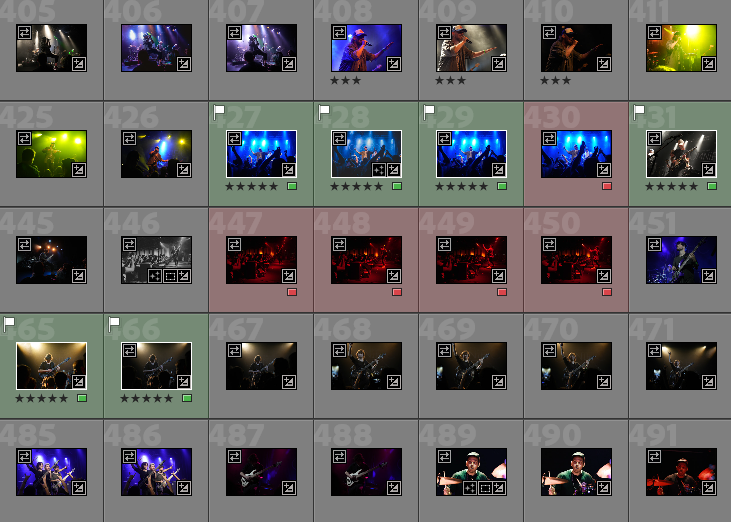
Turn scattered filename lists into flagged photos in a second. SnapSelect instantly parses chaotic filenames, numbers, and client notes that are all over the place, automatically marking the right photos in your catalog.

Requires Adobe Lightroom Classic · Mac & Windows

See it in action

Watch SnapSelect turn a messy client list into a perfectly flagged catalog in seconds.

Eliminate the manual grind

No more hunting for filenames. Drop the text, click a button, and move on.

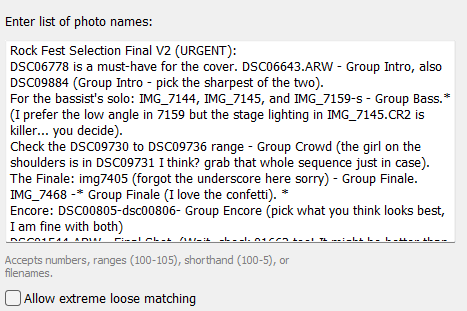
SnapSelect parsing UI
Smart Parsing

Intelligent Text Detection

Clients send confusing lists (A7_543, DSC-03-DSC-06, 124-000543). SnapSelect doesn't care. It detects and filters exactly what you need, ignoring the junk text.

  • Handles multiple file naming conventions
  • Ignores conversational text
  • Instant results
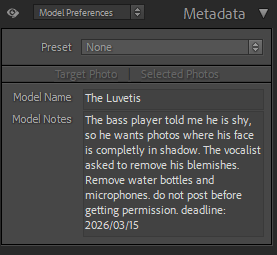
Lightroom metadata panel showing SnapSelect custom fields
Privacy

Private Client Metadata

Inject client names and special editing requests directly into a private Lightroom metadata field.

  • Never leaks into the final export
  • Keeps all info right on the photo
  • No more switching between emails and catalogs
SnapSelect marking options UI
Workflow

Total Marking Control

Apply custom flags, ratings, or color labels. Override existing marks to ensure the final selection is pristine and ready for export.

  • Override existing flags
  • Set Star Ratings & Color Labels
  • Flexible marking options

SnapSelect for Lightroom

SnapSelect for Lightroom

$5

One-time purchase · No subscription

  • Lifetime updates (current version)
  • Works with Adobe Lightroom Classic
  • Windows & Mac
Get SnapSelect

Secure checkout powered by Lemon Squeezy.
Save hours of tedious manual selection work on every project.